 Science Explorer
Search Mode
Search mode selection is only possible when Discipline is set to Astrophysics. For all other Disciplines, search mode is fixed to the default of “All relevant content” and no selector is provided.
All relevant content
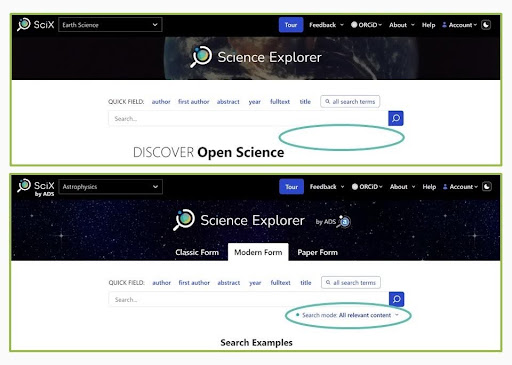
When search mode is set to “All relevant content,” searches include the full SciX corpus unless explicitly limited by some other means and results are sorted by Relevance. This mode is the default for ALL disciplines.
ADS compatibility mode
ADS compatibility mode is only available when Discipline is set to Astrophysics; the Discipline dropdown menu is in the upper left of every SciX header.
ADS compatibility mode will restrict your searches to items in the SciX Astronomy or Physics Collections and return your results sorted by Date with the most recent results first. Items can belong to more than one Collection so you can see items from the Earth Science Collection if they also belong to either of the other two Collections.
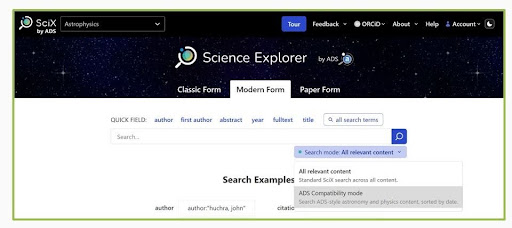
To enter ADS compatibility mode, use the Search mode dropdown menu directly below the search bar on the main search page. Select ADS compatibility mode from your two choices. It should remain set until you change it back.
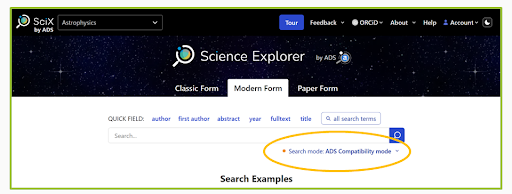
A glance at the lower right of the search bar when you initiate a new search will confirm whether you are in ADS compatibility mode.
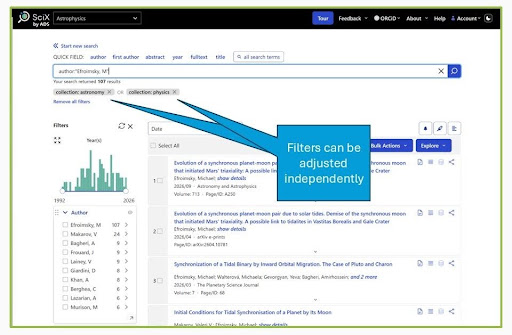
When your results are returned in ADS compatibility mode, you will see the two Collections filters set independently underneath the search bar. You may adjust these independently. Removing the Physics Collection will NARROW your search to just astronomy content. Removing both filters will BROADEN your search to the entire SciX corpus. Regardless of whether you adjust the Collections filters, you may apply any additional filters necessary.
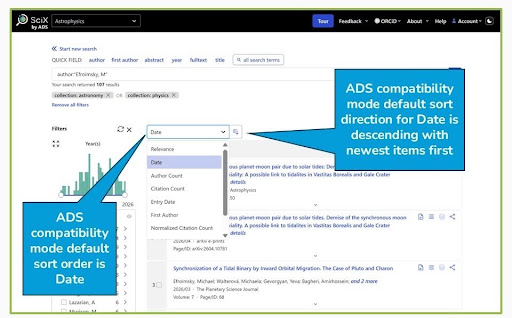
When your results are returned in ADS compatibility mode, they are sorted in Date order with the most recent results first (descending). You can change the sort order and direction for any query, as appropriate.