 astrophysics data system
All Entries in the Category "Searching the ADS"
Search Syntax
Search Basics
ADS’s one box search form supports both fielded and unfielded queries. Unfielded queries without search terms will search the metadata of the publications, including author, publication year, title, abstract, identifiers, and bibstem, which may not produce the expected results. For instance, if you are searching for papers by the author Marc Mars, you want to search for author:“Mars, Marc” instead of Marc Mars to make sure that you don’t return papers that simply have the words “Marc” and “Mars” somewhere in the article metadata.
Fielded Searches
Above the search box we supply shortcuts to frequently used search fields. Simply click on the field that you wish to search and enter your search term in the provided location (generally between the supplied quotation marks). Alternatively, if you start entering the name of a field an autocomplete feature will suggest a list of possible search fields. You may string several search terms or use the filters provided with your results to help narrow the search selection. For instance if you want to find articles published between 1980 and 1990 by John Huchra, you can use:
author:"Huchra, John" year:1980-1990
To get you started, here is a list of search examples for commonly used fields:
| Example Query | Explanation |
|---|---|
| author:“huchra, john” | search for papers written by an author |
| author:“^huchra, john” | limit search to first-author papers |
| ^“huchra, john” | limit search to first-author papers |
| abs:“dark energy” | search for the phrase “dark energy” in abstract, title and keywords |
| year:2000 | search for publications written in 2000 |
| year:2000-2005 | search for publications written between 2000 and 2005 (inclusive) |
| body:“gravitational waves” | search for papers containing the phrase “gravitational waves” in the body of an article |
| full:“gravitational waves” | search for papers containing the phrase “gravitational waves” in a number of fields (title, abstract, body, acknowledgements and keywords) |
| bibstem:ApJ | select papers published in a particular publication |
| object:((SMC OR LMC) AND M31) | using the SIMBAD and NED object search, find papers tagged with either SMC or LMC and M31 |
The rest of this page goes over the search syntax and fields indexed in our database.
Combining Search Terms to Make a Compound Query
You can string together any number of search terms to develop a query. By default search terms will be combined using AND as the default boolean operator, but this can be changed by explicitly specifying OR beween them. Similarly one can exclude a term by prepending a “-“ sign to it (or using the boolean “NOT”). Multiple search words or phrases may be grouped in a fielded query by enclosing them in parenthesis. Some examples:
| Example Query | Results |
|---|---|
| abstract:(QSO “dark energy”) | papers containing both “QSO” and “dark energy” in their abstract |
| abstract:(QSO OR “dark energy”) | papers containing either “QSO” or “dark energy in their abstract |
| author:“huchra, j” abstract:cfa | papers by J. Huchra which have “cfa” in their abstract |
| author:“huchra, j” OR abstract:“great wall” | papers by J. Huchra or which mention “great wall” in their abstract |
| author:“huchra, j” -title:2mass | papers by “J. Huchra” but excludes ones with “2mass” in their title |
| author:“huchra, j” NOT title:2mass | same as above |
| author:“accomazzi, a.” author:“kurtz, m.” | papers authored by both A. Accomazzi and M. Kurtz |
| author:(“accomazzi, a.” “kurtz, m.”) | same as above |
Operator precedence in multi-part searches
Searches involving only two search terms, as shown above, are straightforward to parse. However, for searches with multiple search terms and multiple operators, understanding how operators take precendence over each other is important. For the most control, use parentheses around terms and operators that should be executed first. Otherwise, operators follow these general rules:
- AND, OR, and NOT are set operators, operating on the search terms on either side. AND takes the intersection of the result set of the two search terms, OR takes the union, and NOT takes the difference. NOT takes precendence over AND, which takes precendence over OR.
- The default AND (i.e., not typing out AND but using just a blank space between the two terms, as in the first example above) has lower precedence than any of the Boolean operators above.
- The negative sign (-) is read as “prohibit”; results containing this term are completely excluded. In multi-part queries, its behavior can differ from that of NOT, because of the precedence rules.
| Example Query | Parsed as |
|---|---|
| aff:(China OR “Hong Kong” AND Taiwan) | aff:(China OR (“Hong Kong” AND Taiwan)) |
| aff:(China OR “Hong Kong” Taiwan) | aff:((China OR “Hong Kong”) AND Taiwan) |
| aff:(China OR “Hong Kong” NOT Taiwan) | aff:(China OR (“Hong Kong” NOT Taiwan)) |
| aff:(China OR “Hong Kong” -Taiwan) | aff:((China OR “Hong Kong”) NOT Taiwan) |
For a more heavy handed exploration of the search syntax, feel free to visit the search parser details page.
Synonyms and Acronyms
By default most search terms in ADS are expanded by adding a list of words which are synonyms of the search term. So for example, a search of “star” in the title field will be expanded to include words such as “stars,” “stellar,” “starry,” “starlike,” and so on. (Notice that this often includes words in foreign languages such as “etoile,” “stern,” and “stella”). While this feature improves recall, it sometimes compromises the precision of the results. Our search engine allows one to turn off the synonym expansion feature by simply prepending an “=” sign in front of the search term.
Our search engine also identifies acronyms during indexing and searching (defined as words consisting entirely of uppercase characters). A search for an uppercase word will only match documents which contain that acronym, whereas a search for a lowercase word will match documents which contain any variation of the word, irregardless of its case. Acronyms can themselves have synonyms (for example “ADS” and “Astrophysics Data System” are synonyms), so one should be aware that there is an interaction between case-sensitiveness and synonym expansion. The examples below illustrate these effects:
| Example Query | Results |
|---|---|
| title:star | title contains “star”, any of its synonyms, or the acronym “STAR” |
| title:etoile | title contains “star” or any of its synonyms (etoile being a synonym of star); the results differ from above since “STAR” is not searched for |
| =title:star | title contains “star” or the acronym “STAR” |
| =title:etoile | title contains “etoile” |
| title:STAR | title contains the acronym “STAR” |
| title:(=star -STAR) | title contains “star” but not the acronym “STAR” |
| fuse | the word “fuse” or acronym “FUSE” appear anywhere in the paper |
| FUSE | the acronym “FUSE” appears anywhere in paper |
Author Searches
Synoym expansion also applies to author names, which provide a way to account for changes in a person’s name and/or different spellings due to transliterations. In addition to this, the default author search in ADS is “greedy” in the sense that it will return all documents in which an author signature may match the input search string. This allows, for instance, to have an author search for “Huchra, John” to return papers where the author name appears as “Huchra, John” or “Huchra, J.” By prepending the “=” character to the author search one can disable this feature (as well as any additional synonym expansion) and require an exact match on the author name. Some examples:
| Example Query | Results |
|---|---|
| author:"murray, s" | Least precise variations: finds records authored by any of the following:
|
| author:"murray, stephen" | More precise variations: finds record authored by any of the following:
|
| author:"murray, stephen s" | Most precise variations: finds record authored by any of the following:
|
| =author:"murray, s" | Matches only records authored by "Murray, S." |
| =author:"murray, stephen" | Matches only records authored by "Murray, Stephen" |
| =author:"murray, stephen s" | Matches only records authored by "Murray, Stephen S." |
As a general rule we recommend to use the full name of the person for author searches since as can be seen above the matching rules in ADS are designed to find the maximal set of records consistent with the author specification given by the user. Rather than disabling the name-variation algorithm described above, we recommend performing refinement of search results via the user interface filters for author names as described in the “Filter your search” section.
The logic behind the author search is rather complicated, if you would like to learn more, visit the advanced author search page.
Affiliation Searches
Affiliations in ADS have been indexed in several different search fields, with the intention of allowing multiple use cases. We have currently assigned affiliation identifiers allowing for parent/child relationships, such as an academic department within a university. Note that a child may have multiple parents, but we restrict a child from having children of its own. The list of recognized institutions is available from our Canonical Affiliation repository on Github.
| Example Query | Results |
|---|---|
| aff:“UCLA” | Searches the raw affiliation string, searchable word-by-word |
| inst:“UCLA” | Searches the curated institution name listed in our mapping of organizations to identifiers, which returns all variations of UCLA (e.g. UCLA; University of California, Los Angeles; University of California - Los Angeles) |
For a breakdown to department level:
- Use the “Institutions” filter in the left panel of search results
- Use parent/child syntax as defined in our list of Canonical Affiliations linked above (e.g. inst:“UCLA/IGPP”)
Users are reminded that while affiliation information is largely complete for recent refereed literature, not all records contain an affiliation; therefore, searching by affiliation alone will inherently be incomplete. We strongly recommend combining affiliation searches with author searches for best results.
Astronomical Objects and Position Search
The query modifier object: in fielded searches allows users to search the literature for bibliographic records that have been tagged with astronomical objects by SIMBAD and NED, or for a specified position on the sky (“cone search”). The cone search also makes use of services offered by SIMBAD and NED.
Queries for astronomical objects via object: queries return publications that have been tagged with the canonical names for these objects. This tagging has been done by the SIMBAD and NED teams. Additionally, the object names (as specified in the query) are also used in a ADS query against abstracts, titles and keywords in the astronomy collection (with synonym replacement switched off). The result set is a combination of all these matches. Object queries that target just one service (e.g. SIMBAD) are not currently supported. The data facet can be used to filter the results set.
The syntax for cone searches is:
object:"RA ±Dec:radius"
where RA and Dec are right ascention and declination J2000 positions, expressed in decimal degrees or in sexagesimal notation (hours minutes seconds and degrees arcmin and arcsec). The plus or minus sign before the declination is mandatory. The search radius may be given in arcmin, decimal or sexagesimal degrees (The default search radius is 2’, and the maximum is 60’). Examples:
- A 10’ radius may be written as 0.1667 or 0 10
- The following 3 notations are equivalent:
- 05h23m34.6s -69d45m22s
- 05 23 34.6 -69 45 22
- 80.894167 -69.756111
Searching for publications tagged with objects returned by the coordinates in the example above, with a search radius of 10’ is done as follows:
object:"05h23m34.6s -69d45m22s:0.1667"
Wildcards, Proximity, and Regular expression search
| Example Query | Explanation |
|---|---|
| author:“huchra, jo*” | multi-character wildcard; search for papers written by huchra, john, huchra, jonathan, huchra, jolie, and anything in between |
| author:“bol?,” | single-character wildcard; in this case we may get back bolt, boln, bolm |
| title:(map NEAR5 planar) | instead of a phrase search, we can ask the search engine to consider words be close to each other – the maximum allowed distance is 5; the operator must be written as NEAR[number]; in this example the search terms can appear in any order but there will be at most 5 other terms between (not counting stopwords such as a, the, in…). The proximity search must be used only against fielded search, i.e. inside one index. You cannot use proximity search to find an author name next to a title. If you are looking for token that appear next to each other, then please use a phrase search. For fields that are not tokenized (such as author names) use semicolon as a separator, e.g. author:"kurtz, m; accomazzi, a" OR author:"accomazzi, a; kurtz, m" – in a phrase search the order is important, so we much try both variants. |
facility:/magell.*/ |
Regular expression searches are possible but are less useful than you might expect. Firstly, the regex can match only against indexed tokens - i.e. it is not possible to search for multiple words next to each other. So in practice, this type of search is more useful for fields that contain string tokens (as opposed to text tokens). In practice, this means that a field which contains many words (such as title, abstract, body) is a text field, but a field with only limited number of values is typically defined as a string - for example, author, facility, page. You can use regex in both string and text fields but you have to be aware that regular expression is only going to match indexed tokens. In the case of string fields tokens may be multi-word combinations, depending on the specific field. For example, in the author field one token is huchra, john, but in fulltext the same content will be indexed as two tokens: huchra, john. In all cases the tokens are normalized (typically by lowercasing the input data). A little bit or more of experimentation (test queries) should be enough to help you determine your ‘adversary’. For description of allowed regex patterns, please see: Lucene documentation |
Available Fields
This is a list of fields currently recognized by ADS search engine and the preferred search format - go to comprehensive list of fields if not saturated yet:
| Field Name | Syntax | Example | Notes |
|---|---|---|---|
| Abstract/Title/Keywords | abs:“phrase” | abs:“dark energy” | search for word or phrase in abstract, title and keywords |
| Abstract | abstract:“phrase” | abstract:“dark energy” | search for a word or phrase in an abstract only |
| Acknowledgements | ack:“phrase” | ack:“ADS” | search for a word or phrase in the acknowledgements |
| Affiliation | aff:“phrase” | aff:“harvard” | search for word or phrase in the raw, provided affiliation field |
| Affiliation ID | aff_id:ID | aff_id:A00211 | search for an affiliation ID listed in the Canonical Affiliations list in the child column. This field will soon also accept 9-digit ROR ids. |
| Alternate Bibcode | alternate_bibcode:adsbib | alternate_bibcode:2003AJ….125..525J | finds articles that used to (or still have) this bibcode |
| Alternate Title | alternate_title:“phrase” | alternate_title:“Gammablitz” | search for a word or phrase in an articles title if they have more than one, in multiple languages |
| arXiv ID | arXiv:arxivid | arXiv:1108.0669 | finds a specific record using its arXiv id |
| arXiv Class | arxiv_class:arxivclass | arxiv_class:“High Energy Physics - Experiment” | finds all arXiv pre-prints in the class specified |
| Author | author:“Last, F” | author:“huchra, j” | author name may include just lastname and initial |
| Author (cont.) | author:“Last, First […]” | author:“huchra, john p” | an example of stricter author search (recommended) |
| Author count | author_count:count | author_count:40 | find records that have a specific number of authors |
| Author count (cont.) | author_count:[min_count TO max_count] | author_count:[10 TO 100] | find records that have a range of author counts |
| Bibcode | bibcode:adsbib | bibcode:2003AJ….125..525J | finds a specific record using the ADS bibcode |
| Bibliographic groups | bibgroup:name | bibgroup:HST | limit search to papers in HST bibliography (*) |
| Bibliographic stem | bibstem:adsbibstem | bibstem:ApJ | find records that contain a specific bibstem in their bibcode |
| Body | body:“phrase” | body:“gravitational waves” | search for a word or phrase in (only) the full text |
| Citation count | citation_count:count | citation_count:40 | find records that have a specific number of citations |
| Citation count (cont.) | citation_count:[min_count TO max_count] | citation_count:[10 TO 100] | find records that have a range of citation counts |
| Copyright | copyright:copyright | copyright:2012 | search for articles with certain copyrights |
| Data links | property:data | property:data | limit search to papers with data links (*) |
| Database | database:DB | database:astronomy | limit search to either astronomy or physics or general |
| Date Range | pubdate:[YYYY-MM TO YYYY-MM] | pubdate:[2005-10 TO 2006-09] | use fine-grained dates for publication range |
| Document type | doctype:type | doctype:catalog | limit search to records corresponding to data catalogs (*) |
| DOI | doi:DOI | doi:10.1086/345794 | finds a specific record using its digital object id |
| First Author | ^Last, F author:“^Last, F” |
^huchra, j author:“^huchra, j” |
limit the search to first-author papers |
| Fulltext | full:“phrase” | full:“gravitational waves” | search for word or phrase in fulltext, acknowledgements, abstract, title and keywords |
| Grant | grant:grant | grant:NASA | finds papers with specific grants listed in them |
| Identifiers | identifier:bibcode | identifier:2003AJ….125..525J | finds a paper using any of its identifiers, arXiv, bibcode, doi, etc. |
| Institution | inst:“abbreviation” | inst:“Harvard U” | search the curated list of affiliations (e.g. STScI and “Space Telescope Science Institute” have been matched); the full list is in the Abbrev column in the Canonical Affiliations list |
| Issue | issue:number | issue:10 | search for papers in a certain issue |
| Keywords | keyword:“phrase” | keyword:sun | search publisher- or author-supplied keywords |
| Language | lang:“language” | lang:korean | search for papers with a given language |
| Object | object:“object” | object:Andromeda | search for papers tagged with a specific astronomical object (as shown here) or at or near a set of coordinates (see Astronomical Objects and Position Search above) |
| ORCiD iDs | orcid:id | orcid:0000-0000-0000-0000 | search for papers that are associated with a specific ORCiD iD |
| ORCiD iDs from publishers | orcid_pub:id | orcid_pub:0000-0000-0000-0000 | search for papers that are associated with a specific ORCiD iD specified by a Publisher |
| ORCiD iDs from known ADS users | orcid_user:id | orcid_id:0000-0000-0000-0000 | search for papers that are associated with a specific ORCiD iD claimed by known ADS users |
| ORCiD iDs from uknknown ADS users | orcid_other:id | orcid_other:0000-0000-0000-0000 | search for papers that are associated with a specific ORCiD iD claimed by unknown ADS users |
| Page | page:number | page:410 | search for papers with a given page number |
| Publication | bibstem:“abbrev” | bibstem:ApJ | limit search to a specific publication |
| Properties | property:type | property:openaccess | limit search to article with specific attributes (*) |
| Read count | read_count:count | read_count:10 | search for papers with a given number of reads |
| Title | title:“phrase” | title:“weak lensing” | search for word or phrase in title field |
| VizieR keywords | vizier:“phrase” | vizier:“Optical” | search for papers with a given set of VizieR keywords |
| Volume | volume:volume | volume:10 | search for papers with a given volume |
| Year | year:YYYY | year:2000 | require specific publication year |
| Year Range | year:YYYY-YYYY | year:2000-2005 | require publication date range |
(*) See below for details on these filters. In most cases, filtering of results based on these fields is available in the user interface.
Properties
The “properties” search field allows one to restrict the search results to papers which belong to a particular class. The allowed properties currently include:
| Property flag | Selection |
|---|---|
| ads_openaccess | An OA version of article is available from ADS |
| article | The record corresponds to a regular article |
| associated | The record has associated articles available |
| author_openaccess | An author-submitted OA version is available |
| data | One or more data links are available, see data field |
| eprint_openaccess | An OA version of article is available from a preprint server (e.g. arXiv) |
| esource | An electronic source is available, see esource field |
| inspire | A corresponding record is available in the INSPIRE database |
| library_catalog | A corresponding record is available from a library catalog |
| nonarticle | The record is not a regular article; applies to e.g. meeting abstracts, software, catalog descriptions, etc |
| notrefereed | The record is not peer reviewed (refereed) |
| ocr_abstract | The record’s abstract was generated from OCR (may contain typos or mistakes) |
| openaccess | The record has at least one openaccess version available |
| presentation | The record has one or more media presentations associated with it |
| pub_openaccess | An OA version of article is available from publisher |
| refereed | The record is peer reviewed (refereed) |
| toc | The record has a Table Of Content (TOC) associated with it |
Bibliographic Groups
The “bibgroup” search field allows restriction of the search results to one of the ADS bibliographic groups. These groups are curated by a number of librarians and archivists who maintain either institutional or “telescope” bibliographies on behalf of their projects. Here is a partial list. For more information on the criteria behind the curation of these groups, please see the link above.
The list of current Institutional bibgroups is: ARI, CfA, CFHT, Leiden, USNO
The list of current Telescope bibgroups is: ALMA, CXC, ESO, Gemini, Herschel, HST, ISO, IUE, JCMT, Keck, Magellan, NOIRLab, NRAO, ROSAT, SDO, SMA, Spitzer, Subaru, Swift, UKIRT, XMM
Data Links
The “property:data” search field can be used to select papers which have data links associated to them. The list of archives which ADS links to can be seen under the “Data” filter selection. To generate a list of all records which have data links one can issue a simple query: property:data. Using the property:data search field allows one to focus on data-rich papers, for example:
property:data AND (CXO OR XMM) AND HST
Finds multi-wavelength papers which have observations both in the X-ray spectrum (from Chandra or XMM) and in the optical (HST). Of course additional search terms can be used to further refine the selection criteria.
Document Type
Records in ADS are assigned a document type which is indexed in the “doctype” search field, the contents of which are an extension of the BibTeX entry types. Currently these are the document types indexed by ADS:
| Document Type | Resource associated with record |
|---|---|
| article | journal article |
| eprint | preprinted article |
| inproceedings | article appearing in a conference proceedings |
| inbook | article appearing in a book |
| abstract | meeting abstract |
| book | book (monograph) |
| bookreview | published book review |
| catalog | data catalog (or other high-level data product) |
| circular | printed or electronic circular |
| erratum | erratum to a journal article |
| mastersthesis | Masters thesis |
| newsletter | printed or electronic newsletter |
| obituary | obituary (article containing “obituary” in its title) |
| phdthesis | PhD thesis |
| pressrelease | press release |
| proceedings | conference proceedings book |
| proposal | observing or funding proposal |
| software | software package |
| talk | research talk given at a scholarly venue |
| techreport | technical report |
| misc | anything not found in the above list |
Citation and Reference Operators
When you submit a query, ADS returns a list of search results. Should you want a list of all the articles which cite those search results , or all the articles which are referenced by those search results, you can use the citation or reference operators.
The syntax for these operators are references(query) and citations(query).
| Example Query | Explanation |
|---|---|
| citations(author:“huchra, john”) | returns the list of records citing John Huchra’s papers |
| references(bibcode:2003AJ….125..525J) | returns records cited by the paper 2003AJ….125..525J |
| citations(abstract:JWST) | returns records citing papers which have “JWST” in their abstract |
| references(data:Chandra) | returns records cited by papers in the Chandra data bibliography |
One powerful aspect of having these operators at our disposal when creating a query is that we can combine them with additional search terms to expand or narrow your query. For example, the following query finds all papers which cite the original JWST paper as well as papers which contain the terms “Webb” or “JWST” in their abstract:
citations(bibcode:2006SSRv..123..485G) OR abstract:(Webb OR JWST)
Second-Order Queries
We provide five second-order operators which modify the query results by performing second-order operations on the original query. Theese operators are database functions which form secondary queries based on attributes of the objects returned in an initial query; they can provide powerful methods to investigate complex, multipartite information graphs. To invoke the operators, enter the corresponding operator before your search terms (enclosing your search terms in parentheses) in the search box. The search terms enclosed by parentheses are considered the first-order query.
In addition to the basic information provided below, we have published a tutorial describing these operators in detail, both alone and in conjunction with other functions. It is intended for scientists and others who wish to make fuller use of the SciX database.
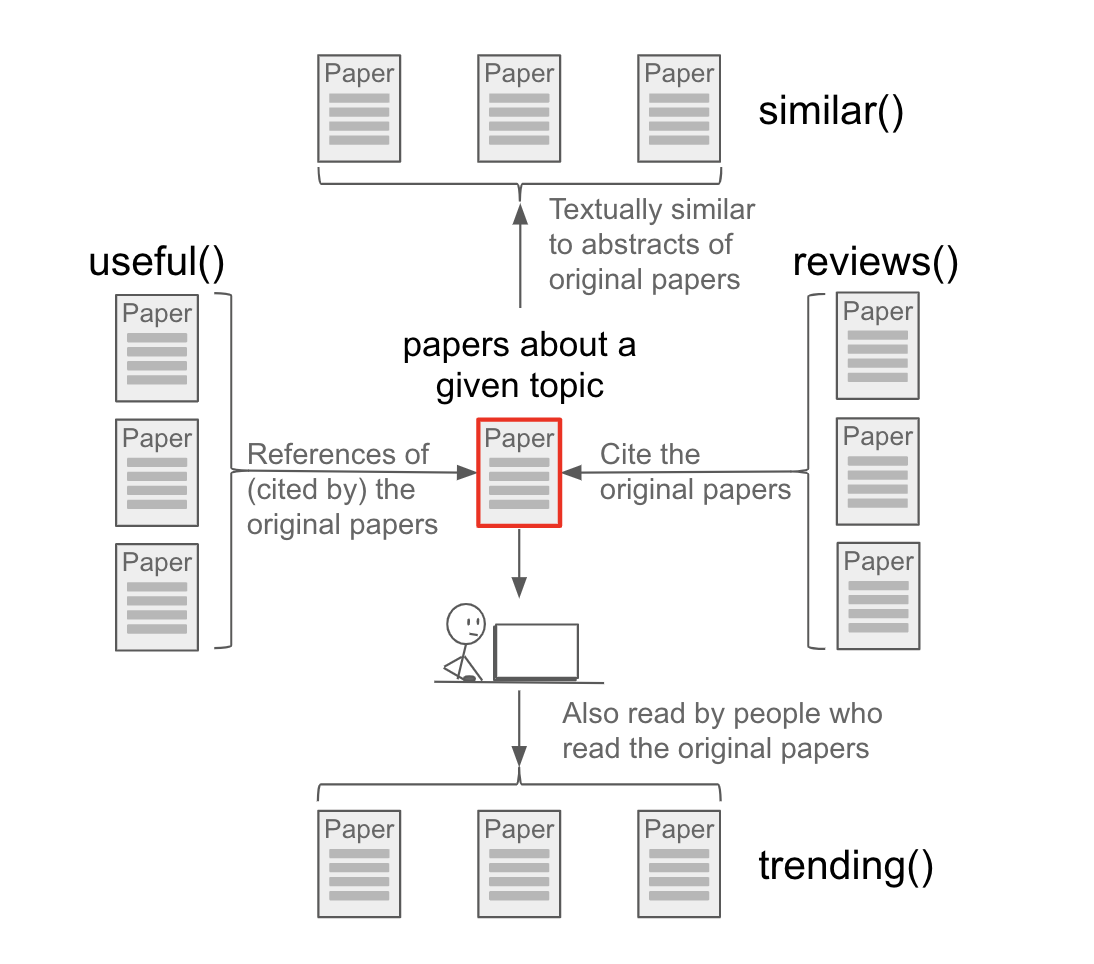
Similar - The similar operator takes the text of the abstracts of the papers in the first-order query, combines them into a single “document,” then ranks all the abstracts in ADS by their text-based similarity to this combined document, and returns the ranked list. The returned results exclude the articles returned by the first-order query. The documents returned are the most similar, as determined via text analysis, to the topic being researched, while excluding the original documents. For example:
similar(bibcode:2000A&AS..143...41K)
will return a ranked list of papers that are textually similar to the given paper, while excluding the given paper from the results.
The next example:
similar("weak lensing" -entdate:[NOW-7DAYS TO *]) entdate:[NOW-7DAYS TO *] bibstem:"arXiv"
will return a ranked list of recent arXiv papers that are textually similar to older papers about weak lensing. Note that since the similar operator excludes results returned by the first-order query, we here use separate date ranges in the first-order query and the outer query in order to force the queries to be disjoint.
Trending – The trending operator takes the lists of readers who read the papers in the first-order query, finds the lists of papers which each of them read, combines these lists, and returns the combined list, sorted by frequency of appearance. The documents returned are most read by users who read recent papers on the topic being researched; these are papers currently being read by people interested in this field. For example:
trending(exoplanets)
will return a ranked list of papers which are currently popular among the readers interested in exoplanets.
Useful – The useful operator takes the reference lists from the papers in the first-order query, combines them and returns this list, sorted by how frequently a referenced paper appears in the combined list. The documents returned are frequently cited by the most relevant papers on the topic being researched; these are studies which discuss methods and techniques useful to conduct research in this field. For example:
useful("galaxy surveys")
will return a ranked list of papers spanning a variety of topics useful to researchers interested in analyzing surveys of galaxies.
Reviews – The reviews operator takes the lists of articles which cited the papers in the first-order query, combines them, and returns this list sorted by how frequently a citing paper appears in the combined list. The documents returned cite the most relevant papers on the topic being researched; these are papers containing the most extensive reviews of the field. For example:
reviews("weak lensing")
will return a ranked list of papers featuring reviews of weak gravitational lensing and its cosmological implications.
TopN – returns the list of top N documents for a user defined query, where they are ordered by their default sort order or a user specified sort order. For example:
topn(100, database:astronomy, citation_count desc)
will return the top 100 most cited astronomy papers.
This next example uses the default sort order for the interior query, so no sort order needs to be specified:
trending(topn(10, reviews("weak lensing")))
This query returns papers currently being read by users who are interested in the field of weak lensing.
Filter Your Search
Once you have a results list from an initial query you can use our filters to further refine your search. Your results list will change each time you apply a limit.
Clicking on any of the listed terms within a filter will automatically apply that term as a filter. If you choose a single term from a given filter, you will be prompted to limit to or exclude the search term from the list of results; if you choose more than one term from within a single filter, you will be prompted to select and (results must contain all of the selected terms), or (results must contain at least one of the selected terms), or exclude (results must not contain the selected terms).
Available filters
- Authors: filter individual authors in the results list
- Collections: include or exclude results from the astronomy, physics, earth science, and general collections
- Refereed status: include or exclude refereed or non-refereed publications
- Institutions: include or exclude results from the curated canonical affiliations that were found in the results of your original query
- Keywords: include or exclude keywords that were found in the results of your original query
- Publications: include or exclude journals that were found in the results of your original query
- Bib Groups: include or exclude results from curated bibliographic groups
- SIMBAD Objects: include or exclude results that contain SIMBAD object types or individual objects
- NED Objects: include or exclude results that contain NED object types or individual objects
- Data: include or exclude results that contain data in various archives (e.g. CDS, HEASARC, CXO, NED)
- Vizier Tables: include or exclude results that have Vizier tables or catalogs
- Publication Type: include or exclude records based on the document type
Example
- Search for author:“Huchra, John”.
- Open the author filter; you will get a list that includes “Geller, M” and “Illingworth, G.” If you want the articles in which “Geller, M.” is a coauthor with “Huchra, John” you would click on the name “Geller, M.” in the list.
- If you want the articles in which either “Geller, M.” or “Illingworth, G” were coauthors you would click the boxes next to both of their names and choose “or” from the selection box. If you want the articles in which both “Geller, M.” and “Illingworth, G” were coauthors you would click the boxes next to both of their names and choose “and” from the selection box. (There should be zero results for this query!)
Positional Field Searches
The pos() operator allows you to search for an item within a field by specifying the position in the field. The syntax for this operator is pos(fieldedquery,position,[endposition]). If no endposition is given, then it is assumed to be endposition = position, otherwise this performs a query within the range [position, endposition] where position is the leftmost position considered and endposition is the rightmost. For example:
| Example | Results |
|---|---|
| pos(author:”Oort, J”,2) | papers that have “J. Oort” as the second author |
| pos(author:”Oort, J”,2,2) | same as above |
| pos(author:”Oort, J”,1,3) | papers that have “J. Oort” as first, second, or third author |
| pos(author:”Oort, J”,-1) | papers that have “J. Oort” as the last author, could be only author |
| pos(author:”Oort, J”,-2,-1) | papers that have “J. Oort” as either of the last two authors |
| pos(aff:harvard,1) | papers for which the first author has a Harvard affiliation |
| pos(title:M31,1) | papers for which the title starts with “M31” |
Currently the pos() operator works on these fields: author, aff, title.
Comprehensive List of Solr Fields & Operators
This is an extensive list of methods of querying the ADS system. It is a technical document and you probably don’t need to read it unless you are interested in performing advanced searches.
Solr (Virtual) Fields, Operators, and Other Stuff
An aggregated list of the fields, operators, and other parameters that are accessible from Solr. Descriptions of what they are used for, and why or where they should or should not be shown to users.
| Field Name | Searchable | Retrievable | Explanation |
|---|---|---|---|
| _version_ | y | y | Integer (timestamp-like) indicating internal versioning sequence, if it has changed it means the record has been reindexed |
| abs | y | y | Virtual field to search across title, keyword, abstract fields in one operation |
| abstract | y | y | Abstract of the record |
| ack | y | n | Contains acknowledgements extracted from fulltexts (if identified in article). |
| aff | y | y | Affiliation strings of authors (raw data), values correspond to order of author field. Multiple values separated by ;. See canonical data for all things aff_ |
| aff_abbrev | y | y | List of curated institution abbreviations for a given paper |
| aff_canonical | y | y | List of curated institution names |
| aff_facet_hier | y | y | Hierarchical label consisting of Level/Parent/Child - i.e. 1/CSIC Madrid/Inst Phys. List of values is not linked to order/number of authors. |
| aff_id | y | y | List of curated affiliation IDs in a given paper, values correspond to order of author field. Multiple values separated by ; |
| affil | y | n | Virtual field searching across aff_abbrev, aff_canonical, aff_id, institution, aff |
| alternate_bibcode | y | y | List of alternate bibcodes for the document |
| alternate_title | y | y | Alternate title, usually when the original title is not in English |
| arxiv_class | y | y | arXiv class the paper was submitted to |
| author | y | y | List of authors on a paper (multivalued field, order is preserved; see aff* and orcid* fields for additional details) |
| author_count | y | y | Number of authors on a paper (integer) |
| author_facet | y | n | Contains normalized version of the author name, cannot be retrieved but useful for faceting |
| author_facet_hier | y | n | Hierarchical facet for author names, the levels can be used to limit result sets - i.e. 0/Surname -> 1/Surname/N or 1/Surname/Name |
| author_norm | y | y | List of authors with their first name initialized (see author_facet) |
| bibcode | y | y | ADS identifier of a paper |
| bibgroup | y | y | Bibliographic group that the bibcode belongs to (curated by staff outside of ADS) |
| bibgroup_facet | y | n | As above, but can only be searched and faceted on |
| bibstem | y | y | the abbreviated name of the journal or publication, e.g., ApJ. Full lists of bibstems can be found here |
| bibstem_facet | y | n | Technical field, used for faceting by publication. It contains only bibstems without volumes (eg. Sci) |
| body | y | n | Contains extracted fulltext minus acknowledgements section |
| book_author | y | y | The name will be also in author field; but not the other way around |
| caption | y | y | Captions extracted from illustrations/tables |
| citation | y | y | List of bibcodes that cite the paper |
| citation_count | y | y | Number of citations the item has received |
| citation_count_norm | y | y | Number of citations normalized by author_count |
| cite_read_boost | y | y | Float values containing normalized (float) boost factors. These can be used with functional queries to modify ranking of results. |
| classic_factor | y | y | Integer value containing a popularity boost factor, of the form log(1 + cites + norm_reads), where number of citations has been normalized and the whole value is multiplied by 5000 and then cast to Integer. |
| comment | y | y | Kitchen sink for holding various bits of information not available elsewhere (probably only useful if you are curating ADS records) |
| copyright | y | y | Copyright given by the publisher |
| data | y | y | List of sources that hold data associated with this paper (record) - format is name:count, i.e. Chandra:3 |
| data_facet | y | n | Data sources for the paper (without counts, but the counts can be retrieved when faceting on the values of this field) |
| database | y | y | Database (collection) into which the paper was classified, a paper can belong to more than one |
| date | y | y | Machine readable version of pubdate, time format: YYYY-MM-DD'T'hh:mm:ss.SSS'Z' |
| doctype | y | y | Types of document: abstract, article, book, bookreview, catalog, circular, editorial, eprint, erratum, inbook, inproceedings, mastersthesis, misc, newsletter, obituary, phdthesis, pressrelease, proceedings, proposal, software, talk, techreport |
| doctype_facet_hier | y | n | Hierarchical facets consisting of nested document types |
| doi | y | y | Digital object identifier |
| editor | y | y | Typically for books or series, similar rules to book_author |
| eid | y | y | Electronic id of the paper (equivalent of page number) |
| y | n | List of e-mails for the authors that included them in the article (is only accessible to users with elevated privileges) | |
| entdate | y | y | Creation date of ADS record in user-friendly format (YYYY-MM-DD) |
| entry_date | y | y | Creation date of ADS record in RFC 3339 (machine-readable) format |
| esources | y | y | Types of electronic sources available for a record (e.g. pub_html, eprint_pdf) |
| facility | y | y | List of facilities declared in paper (low count field for now) |
| first_author | y | y | First author of the paper |
| first_author_facet_hier | y | n | See author_facet_hier |
| first_author_norm | y | n | See author_norm |
| fulltext_mtime | y | y | Machine readable modification timestamp; corresponds to time when a fulltext was updated |
| grant | y | y | Field that contains both grant ids and grant agencies. |
| grant_facet_hier | y | n | Hierarchical facet field which contains grant/grant_id. This field is not suitable for user queries, but rather for UI components. Term frequencies and positions are deactivated. |
| id | y | y | Internal identifier of a record, does not change with reindexing but users are advised to not rely on contents of this field |
| identifier | y | n | A field that can be used to search an array of alternative identifiers for the record. May contain alternative bibcodes, DOIs and/or arxiv ids. |
| indexstamp | y | y | Date at which the record was indexed YYYY-MM-DD'T'hh:mm:ss.SSS'Z' |
| inst | y | n | Virtual field to search across aff_id, and institution |
| institution | y | n | List of curated affiliations (institutions) in a given paper. See institution data |
| isbn | y | y | ISBN of the publication (this applies to books) |
| issn | y | y | ISSN of the publication (applies to journals - ie. periodical publications) |
| issue | y | y | Issue number of the journal that includes the article |
| keyword | y | y | Array of normalized and non-normalized keywords |
| keyword_facet | y | n | Like keyword but used for faceting |
| keyword_norm | y | y | Controlled keywords, if it was identified |
| keyword_schema | y | y | Schema for each controlled keyword, i.e., the schema of a keyword if it can be assigned |
| lang | y | y | In ADS this field contains a language of the main title. Currently, this value is present in a very small portion of records |
| links_data | y | y | Internal data structure with information for generating links to external sources (API users are advised to use link resolver service instead) |
| metadata_mtime | y | y | Machine readable modification timestamp; corresponds to time when bibliographic metadata was updated |
| metrics_mtime | y | y | Machine readable modification timestamp; corresponds to time when citations metrics were updated |
| ned_object_facet_hier | y | y | Hierarchical Level/Parent/Child entry for NED objects |
| nedid | y | y | List of NED IDs within a record |
| nedtype | y | y | Keywords used to describe the NED type (e.g. galaxy, star) |
| nedtype_object_facet_hier | y | n | Hierarchical facet consisting of NED object type and ID |
| nonbib_mtime | y | y | Machine readable modification timestamp; corresponds to time when non-bibliographic metadata was updated |
| orcid | y | n | Virtual field to search across all orcid fields |
| orcid_mtime | y | y | Machine readable modification timestamp; corresponds to time when data were fetched from ORCiD |
| orcid_other | y | y | ORCID claims from users who used the ADS claiming interface, but did not give us consent to show their profiles |
| orcid_pub | y | y | ORCID IDs supplied by publishers |
| orcid_user | y | y | ORCID claims from users who gave ADS consent to expose their public profiles. |
| page | y | y | First page of a record |
| page_count | y | y | If page_range is present, gives the difference between the first and last page numbers in the range |
| property | y | y | Array of miscellaneous flags associated with the record. For possible values see Properties. |
| pub | y | y | Canonical name of the publication the record appeared in |
(Advanced) Search Syntax
The following page describes extra details about the search syntax not found in the otherwise comprehensive search syntax help.
Big Picture
The search has two distinct phases:
- building the query
- executing the query, collecting results
The first phase is what we are going to discuss here. We’ll break it down further into:
- parsing text into the AST (abstract syntax tree)
- modifying the query tree (semantic parsing)
- building the query object
Building the Query
The Search Grammar defines the search language of ADS. It is a context-free grammar and it is used to generate a client library (by ANTLR).
If you don’t like reading context-free computer grammars (who does?) you’ll find a good explanation of ADS syntax here: search syntax help.
But as a reward for having found this obscure corner of the help, we’ll illustrate a few more special situations not covered there.
Operators
The search operators have the following precedence (from higher to lower priority): NEARx -> NOT -> AND -> OR -> " "
Some details worth mentioning:
Empty space is the default AND
Better to illustrate it by way of examples:
jim and john not mary becomes behind the scenes: (jim AND (john NOT mary)) because NOT has precedence over AND. But john jim and mary becomes (john AND (jim AND mary)) because AND operator has precedence over empty space (operator) – notice how jim and mary is evaluated as a group: i.e. the query is not parsed as john AND jim AND mary.
You can modify the default operator
It can also be changed on demand by adding q.op=OR into URL parameters (i.e. NOT inside the search form), in which case the logic will change dramatically. For any given query the results will contain many more records, but if sorted by relevancy score, the top items will be still the ones returned with the default AND operator.
ADS supports proximity searches for text fields
Yes, many people may not know about it, but you can do stuff like: title:(dog NEAR5 cat) – this will find any mention of the barking animal appearing up to 5 text words (tokens) from the meowing animal. The NEAR has to be followed by a number [1-5] and it will not care about the order; i.e. cat NEAR5 dog == dog NEAR5 cat – this search can be very powerful, especially if applied against fulltext. It can also be quite expensive (computationally) - especially when the search term(s) have synonyms. Use this operator with fielded queries on text fields such as full, abs, title.
There is no in-order proximity operator, but ADS still supports this feature
ADS has a limited support for in-order proximity - if you make a phrase search like so abs:"newtonian solar"~3 the word newtonian (and its synonyms) will have to be followed by solar (and its synonyms) for up to 3 positions away. We do not have a special operator for it though; if what you search for has more than 2 words, we’ll decide how far apart they can be. For example if you do abs:"one two three"~3 then one may be 3 words away from two three (and it doesn’t matter that there are really 4 tokens between one and three).
Syntax Parsing
OK, so back to the syntactic parsing – how does it actually work? We have a formal grammar which describes the query language. Based on that, we have generated a library (in Java) which is included inside SOLR, our search engine. When SOLR receives the user input, before it can start searching for documents, the user query (string) will be turned into a query object. And that is the objective of the parser. First comes the syntactic phase during which an ANTLR parser will be ‘eating’ input character by character. It will occassionally veer off to explore a possible (alternative) branch, to either pursue it further or return back and start branching from some previous position. The input has to be syntactically correct; if we explored all possible readings and there are still some input characters left, it means the input is non-conforming and we’ll generate an exception and give up.
If the query is correct, however, after the parser is finished parsing, we’ll have the AST (Abstract Syntax Tree): a hierarchical datastructure (a tree) instead of the flat chain of characters.
Here an example (it is only an illustration, inside the search engine the AST will be richer):
"(this) (that)" 	->
                            (DEFOP
(CLAUSE (                               (CLAUSE (
    DEFOP (                                 DEFOP (
        MODIFIER (                              MODIFIER (
            TMODIFIER (                             TMODIFIER (
                FIELD (                                 FIELD (
                    QNORMAL this))))))                      QNORMAL that)))))))
In human words: the input (this) (that) has been parsed into an AST; the tree starts at a DEFOP node (default operator) which has two children (CLAUSEs). Each CLAUSE itself is made of a strict chain of components: DEFOP->MODIFIER->TMODIFIER->FIELD – they are all empty (with implicit value of none). It is only after we have arrived to a terminus QNORMAL that we also see values. Inside the tree, we will have information about every bracket, position, and links to parent/children.
This tree will be further modified in the next phase.
Semantic Parsing
There is a lot of magic that happens in this next phase. All of it is defined inside the pipeline.
Pro tip: if you add debugQuery=true to your search request URL parameters (and look at the data as returned by our API), you’ll see the serialized version of the query as parsed by SOLR. For example
"debug":{
    "rawquerystring":"abs:\"newtonian solar\"~3",
    "querystring":"abs:\"newtonian solar\"~3",
    "parsedquery":"CustomScoreQuery(custom(abstract:\"syn::newton syn::solar\"~3 title:\"syn::newton syn::solar\"~3 keyword:\"syn::newton syn::solar\"~3, sum(float(cite_read_boost),const(0.5))))",
    "parsedquery_toString":"custom(abstract:\"syn::newton syn::solar\"~3 title:\"syn::newton syn::solar\"~3 keyword:\"syn::newton syn::solar\"~3, sum(float(cite_read_boost),const(0.5)))",
    ...
}
(Advanced) Author Search
The following section describes, in ugly detail, the logic of author parsing and searching.
Referenced resources
Big Picture
What happens when we search for author:"Adamczuk, Peter"?
First, the query string is turned into an abstract syntax tree (see search parser for details). The query parser will see that we are searching the field author and apply the tokenizer chain (rules) specified for that field. So it will run the input through the author tokenizer, which has a number of steps involved in transforming the input text into what gets indexed and searched.
There is also quite a difference between what we do at index time, and at the search time in order to optimize searches and maximize both precision and recall.
Details
Let’s consider as an example the case of an author whose full name is Adamčuk, Piotr Gavrilov Eugenyi.
People using our search engine may be unable to remember all his names, misremember the last name as Adamczuk, assume his first name with Peter (which he has occasionally published under), and not know about his additional middle names Gavrilov and Eugenyi which might have been transcribed in the past in multiple ways such as Evgenij, Eugenij, Eugen, Evzen.
As you can imagine, balancing accuracy and retrieval for author names searches is going to be tricky. Let’s imagine that a user searches for this scientist’s paper using the following query:
author:"peter adamczuk"
Normalization
The first step we perform is name normalization, in order to ensure that the author name is properly formatted. Our search tokenizer is going to take the input in its entirety (the full string peter adamczuk with NO tokenization into peter and adamczuk) and will pass the input to a name parsing Python library. Since the search engine is written in Java, in reality the library will be executed by Jython.
The library will parse the input string to identify its components: surname, first name, and optionally middle name(s), titles, suffixes, etc. So Pope John Paul the II would lose all his titles and be normalized to Paul, John, II. In our example, Peter is recognized as the first name, and Adamczuk as the last name.
Normalization also involves removal of excessive whitespace, punctuation, hyphens, apostrophes, etc. For example, Adamczuk , P becomes Adamczuk, P, and Lao'tzu becomes Lao tzu,. We also limit the number of names allowed for a single author to 6 tokens.
Transliteration
The next step involves name transliterations, which map “similar” classes of characters to a common format. English is the Lingua Franca of scientific discourse, but author names span a huge variety of character sets. Transliterations allow author names containing a variety of accented characters to be found when searching for their ASCII equivalent. For example, a search for jonas would find the name jonáš as well. Internally in our database we use the UTF-8 character encoding so that we can properly represent the original author name but we don’t force the English-centric writers to think in more than 26 characters of the English alphabet.
So in the case of adamczuk, p at this stage we will discover that the ADS database contains adamčuk, peter and any of its variations such as adamčuk, p if present.
How are transliterations generated and managed? We periodically go through our author index and for each name not already in ASCII format we generate its equivalent mappings, for example:
adamczuk, p => adamčuk, p
adamczuk, peter => adamčuk, peter
adamczuk, piotr => adamčuk, piotr
Some of the transliteration rules are custom to ADS, but the majority stemming from Java Unidecode library. The generated vocabulary of names has at this point millions of entries and contains every non-Latin character that has ever appeared in the ADS author database. The dictionary is then used (at search time) to lookup UTF-8 variants when users give us an ASCII name.
Synonyms
Normalization and transliteration transform the original input from peter adamzuk to adamczuk, peter, to (adamczuk, peter, adamčuk, peter). Next we proceed to discover all other known names of this person. ADS curators maintain a knowledge base of known name changes and aliases for scientists in our database. That is what gets consulted in the next step, where we might discover that adamčuk, peter has also published as adamčuk, piotr and was previously known as adamčuková, petra, in which case we augment our name search to include the additional variation.
So the parser will tentatively generate a multitude of possible names and spellings and will use them all to search for them. As a way of example, this is what we’ll get:
- adamzuk, peter
- adamczuk, peter
- adamčuk, peter
- adamčuk, piotr
- adamčuková, petra
All these names were added because our parser consulted the knowledge base of author names. Our parser doesn’t know this is one and the same person; but it has a way of seeing/discovering the chain of name changes. If the knowledge database is correct, which is most of the time, it will be able to start from the user input and arrive at other names.
Next, we’ll use all of the author names discovered so far, and take one step further – we’ll generate all the possible name variations that might be derived from them using abbreviations. For example, an author with a middle name such as John James Doe might appear in the scientific literature as Doe, J., Doe, John, Doe, John J., and possibly Doe, John James and Doe, John J.
At query time, the author search will adapt its strategy based on the user input. If for example the user entered acamczuk, p then our parser will assume they are looking for any adamczuk whose first name starts with “p” (i.e. adamczuk, p*), and give them all peters, piotrs, pauls, pans and pons. However, if the user typed adamczuk, peter then the search engine will instead return adamczuk, peter, adamczuk, peter <some other name>, adamczuk, p, adamczuk, p <some other name> and all of the variations and synonyms thereof (adamčuk, peter, adamčuková, petra, adamčuková, petra *, etc.)
Conclusions
So what started as a seemingly simple search has, behind the scenes, transformed into a massive and very complicated query. Our implementation of author searches attempts to strike a balance between the desire to be precise, and the desire to be inclusive (recall). The logic is complex, it takes advantage of what ADS knows about publishing conventions and supplements it with a curated knowledge base, which we regularly update based on user input.
If an author search produces unexpected results, it usually is because of these reasons:
- the curated knowledge base is too broad or too narrow: i.e. it is missing a synonym, or has a synonym too many – and joins unrelated names together
- haphazard interferences: the transliterations as implemented mistakenly map distinct author names to the same equivalent ASCII version, and end up retrieving records authored by distinct scientists with similar names
One possible solution to the ambiguity problem is to perform an exact author search, which bypasses the steps described above by prepending the equal sign (=) to the author search field, e.g. =author:"adamčuk, peter".